
Best Shopify low stock apps reviewed in 2026
Low stock apps are a common way to tell shoppers that a product is running out, so they don't put off a purchase they already want to make. An "Only 3 left" message is standard in all 7 apps here. The differences are in the details, such as whether the count changes with the selected size or also appears on collection pages.
I installed 7 Shopify low stock apps on a test store and compared their features, pricing and merchant reviews. Below, you'll find what each one does well, where it falls short and the type of store it suits best.
Which Shopify low stock apps made my shortlist?
I selected apps with a rating of 3.5 or higher and at least 9 merchant reviews. These 7 low stock apps made my shortlist:
- Vitals: all-in-one Shopify app with a low stock message and 40+ apps in one subscription
- Scarcity+Urgency Stock Counter: AI-written counters on product and collection pages for $4.99/month
- CI Low Stock Counter: a free plan with no watermark, then the lowest paid price at $2.99/month
- ET Scarcity Low Stock Counter: a plain free plan with variant counts and a progress bar
- Scarcity++ Low Stock Counter: a different message at each stock level
- Ultimate Scarcity Pro: a free set of timers, stock bars and sales pops
- Sold Count: Low Stock Counter: sold counts alongside the low stock message
How did I review the best Shopify low stock apps?
I installed each app on a test store, then went through each App Store listing, every plan and the newest and lowest-rated merchant reviews.
I looked at these details for each app:
- Counter types: which formats it offers, such as a live count, a progress bar or a sold count
- Where it shows: product pages, collection pages or the cart
- Variants: whether the count changes when a shopper picks another size or colour
- Rules: which stock level starts the message and which products show it
- AI features: what AI does in each app
- Integrations: which page builders and inventory sources it names
- Setup: how long each app took me to get a counter live
- Design: how each counter looked on my test store and which colours, fonts and layouts each listing says you can change
- Speed: what a low stock app adds to page speed on a store that already runs other apps
- Pricing: how each app charges, its plan limits and what each plan includes
- Reviews: what the newest and lowest-rated App Store reviews say, including about support
I ranked the list by where I'd start for a typical store, with the all-in-one app first, then the counter apps by how much they include and how recently merchants have reviewed them.
What did I find across these Shopify low stock apps?
I found 5 main low stock options across the apps I reviewed. The apps differ on which ones they include, so check which you need before you compare prices:
- Live count: a message such as "Only 3 left". All 7 apps include it.
- Progress bar: a bar beside the message. Vitals, Scarcity+Urgency, ET Scarcity and Ultimate Scarcity Pro list one, although the length of the Vitals bar is only styling.
- Variant counts: a count that changes with the selected size or colour. Vitals, CI and ET Scarcity list it, and a Scarcity++ reviewer confirms it. I didn't find it on the other 3 listings.
- Collection page counters: a count on the product grid. Scarcity+Urgency and CI include it, and Sold Count keeps it for its paid plan.
- Sold-out messages: your own text once stock runs out. Vitals, CI, Scarcity++ and Sold Count list them, and Scarcity+Urgency tags out of stock.
I also found these differences beyond the main options:
- Other urgency formats: Ultimate Scarcity Pro adds timers, social proof, sales pops and a cart reservation bar. Sold Count adds sold counts and a timer on its paid plan. Vitals has a separate Countdown Timer app in the same subscription.
- Stock rules: Vitals uses one level across the store, with a default of 50. Scarcity++ sets different messages for different levels, and ET Scarcity lists visibility conditions.
- Reports: I didn't find a report on sales from the counter on any listing. Scarcity+Urgency, ET Scarcity and Scarcity++ tag inventory tracking, and the Vitals Stock Scarcity page doesn't list a report.
- AI features: Scarcity+Urgency's AI copywriter writes the urgency text. With Vitals MCP, you can do everything in Vitals with Claude or ChatGPT, including setting up the stock counter. I didn't find AI features in the other 5.
- Integrations: Scarcity+Urgency names GemPages, PageFly and dropshipping sources such as DSers and Meesho. CI names GemPages and Horizon, and the Vitals listing names PageFly.
- Setup: Vitals took me about 4 minutes, the least of the 7, and the others took about 5 to 8 minutes.
- Design: almost every app was responsive, user friendly and customisable on my test store. The listings offer colour and style controls on all 7. CI's free plan limits text and style changes, and Sold Count's free plan has basic customisation only.
- Speed: one counter on its own didn't hurt my page speed. But a store also needs apps for reviews, bundles and discounts, many stores have 10-15 apps, and every new app affects page speed. Vitals surprised me, because its 40+ apps share one script, so I could turn any of them on or off without worrying about load time.
What are the best Shopify low stock apps?
Vitals is my top pick, because its low stock message comes with 40+ other apps in one subscription. Scarcity+Urgency comes next for stores that want a dedicated counter on product and collection pages for $4.99/month. The 5 reviews after it suit a free plan, simple variant counts, messages for each stock level or a wider set of urgency tools.
1. Vitals
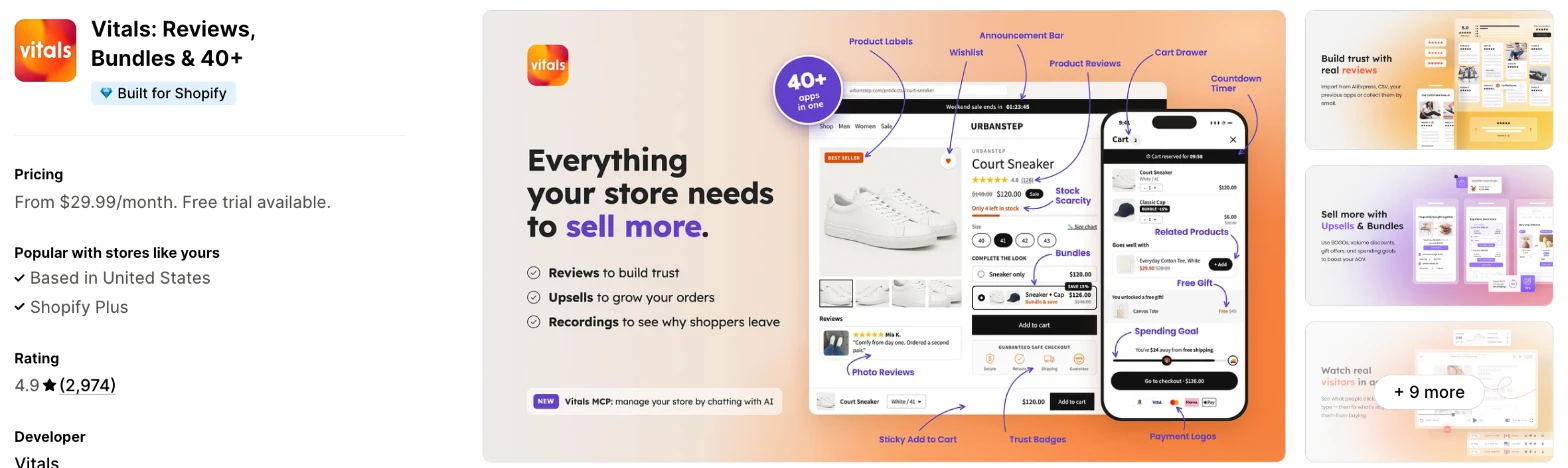
Vitals is an all-in-one Shopify app, and its Stock Scarcity app is one of 40+ apps in one subscription. It makes more sense when you also need reviews, bundles or a countdown timer and don't want a separate app for each.
Why I like this app:
I like that the count comes straight from Shopify inventory, so I had nothing to update, and it changes when a shopper picks another size or colour. It took me about 4 minutes to get the message live. I could rewrite the wording around a `{{ stock }}` placeholder and choose a dot or a bar, although the bar's length is only styling. A second message can run on sold-out variants that stay on sale. But the message only appears on product pages, with one stock level across the store.
Features:
- A low stock message using the live Shopify count
- A count that updates with the selected variant
- One stock level for the whole store, with a default of 50
- A second message for sold-out variants you keep selling
- Rules that include or exclude specific products
- Your own wording, with a placeholder for the live count
- A dot or bar layout
- Controls for text, dot and bar colours and font size
- Placement through the theme editor or an app block
- Translations for each language your store sells in
- Countdown Timer, Back in Stock and Cart Notice apps in the same subscription
- Vitals MCP, for doing everything in Vitals with Claude or ChatGPT
- 40+ apps in the same subscription
Pricing: Vitals has one plan, with all 40+ apps included:
- All in one plan: $29.99/month
- Trial: 7 days
Reviews: Vitals has 4.9 stars from 2,974 reviews on the Shopify App Store. Recent reviewers like having many apps together and praise customer support, and one long-term merchant says support is knowledgeable whenever they need it.
Best for: A store that wants a low stock message, a countdown timer and back in stock alerts in one subscription, along with reviews and bundles.
See Vitals on the Shopify App Store
2. Scarcity+Urgency Stock Counter
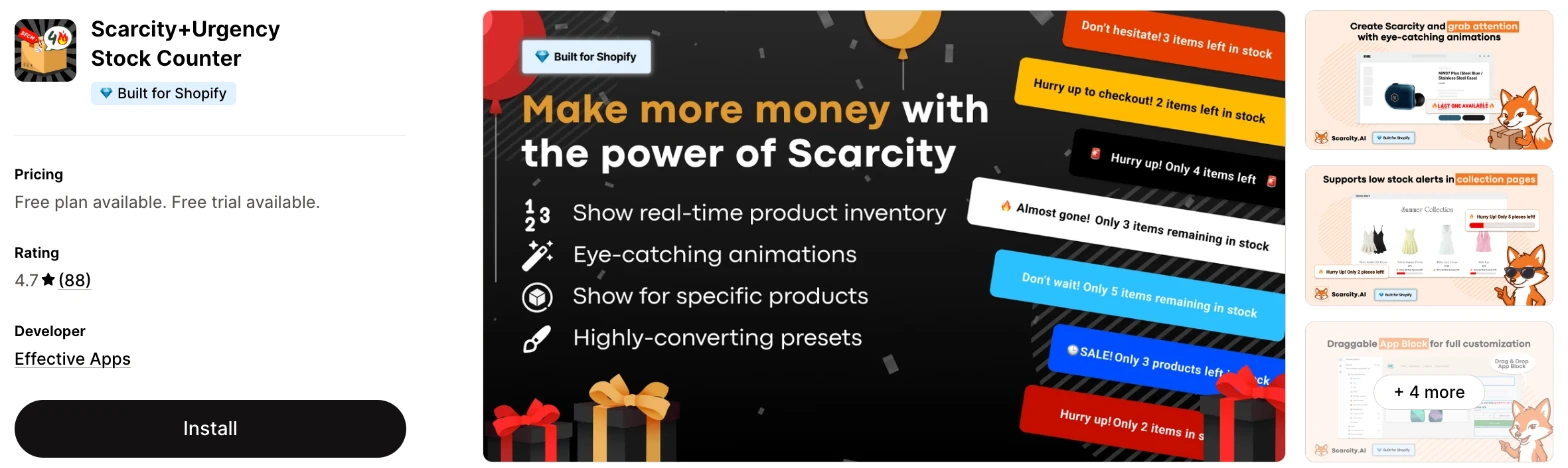
Scarcity+Urgency Stock Counter is a low stock app with animated counters for product and collection pages. Choose it when you want a dedicated counter and don't want to write the urgency text yourself.
Why I like this app:
The AI copywriter is what I noticed first, because no other counter here writes the message for me. I also found counters on collection pages, a threshold by inventory level and presets for Black Friday and Christmas. It took me about 5 to 8 minutes to get a counter live. Reviewers often mention quick support, and one store uses it to show the seats left in its workshops. However, the "free plan" is for development stores only, so a live store pays from day 8.
Features:
- A live "only x left" counter
- An animated progress bar, with shaking and blinking effects
- An AI copywriter for the urgency text
- A low stock threshold by inventory level
- Counters on specific products, collections or the whole store
- Counters on collection pages
- Black Friday, Cyber Monday and Christmas presets
- Inventory from Roposo Clout, GlowRoad, Meesho, Modalyst and DSers
- GemPages and PageFly
Pricing: Scarcity+Urgency charges a flat fee:
- Development stores: free, for testing only
- Monthly plan: $4.99/month, or $41.92/year
- Trial: 7 days
Reviews: Scarcity+Urgency has 4.7 stars from 88 reviews on the Shopify App Store, the most of the 6 dedicated apps. Recent reviewers praise the support and how it looks, and one merchant moved here after another scarcity app clashed with their site. Its 2 one-star reviews have no written detail, and a 2024 reviewer missed multi-language support.
Best for: A store that wants counters on its collection pages and AI-written urgency text at a low flat price.
See Scarcity+Urgency Stock Counter on the Shopify App Store
3. CI Low Stock Counter
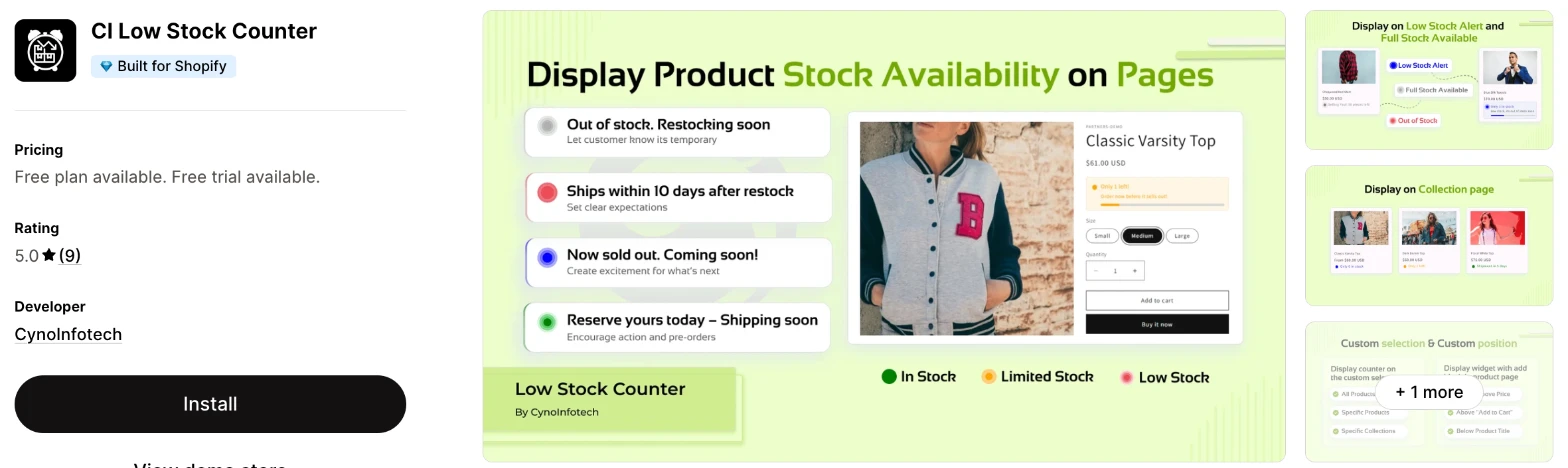
CI Low Stock Counter is a stock message app for product and collection pages, with a different message for each stock state. I'd choose it when you want to spend as little as possible and still cover collection pages.
Why I like this app:
CI's free plan impressed me most, because it includes unlimited product and collection pages with no watermark. I also found messages that update with the selected variant, and it took me about 5 to 8 minutes to get one live. Recent reviewers name the support team, including quick replies on WhatsApp and help during setup. But the "only 1 left" and low stock warning needs Premium, and the app only launched in March 2026, so its 9 reviews cover a short period.
Features:
- Low stock, limited stock, last stock, full stock and out of stock messages
- A count on product and collection pages
- A message that updates with the selected variant
- Counters on all products, selected products or collections
- Controls for font, colour and style
- GemPages and Horizon
I didn't find any AI features in it.
Pricing: CI charges a flat fee:
- Free: unlimited pages, limited text and style changes, no watermark
- Premium: $2.99/month or $33/year, adds the "only 1 left" and low stock warning, full text and style changes and priority support
- Trial: 3 days
Reviews: CI has 5.0 stars from 9 reviews on the Shopify App Store. Recent reviewers praise fast support, and one likes the warning that appears under the variant. I didn't find a review below 5 stars, although most reviewers had used it for less than a day when they wrote.
Best for: A small store that wants stock messages across its product grid for $2.99/month or less.
See CI Low Stock Counter on the Shopify App Store
4. ET Scarcity Low Stock Counter
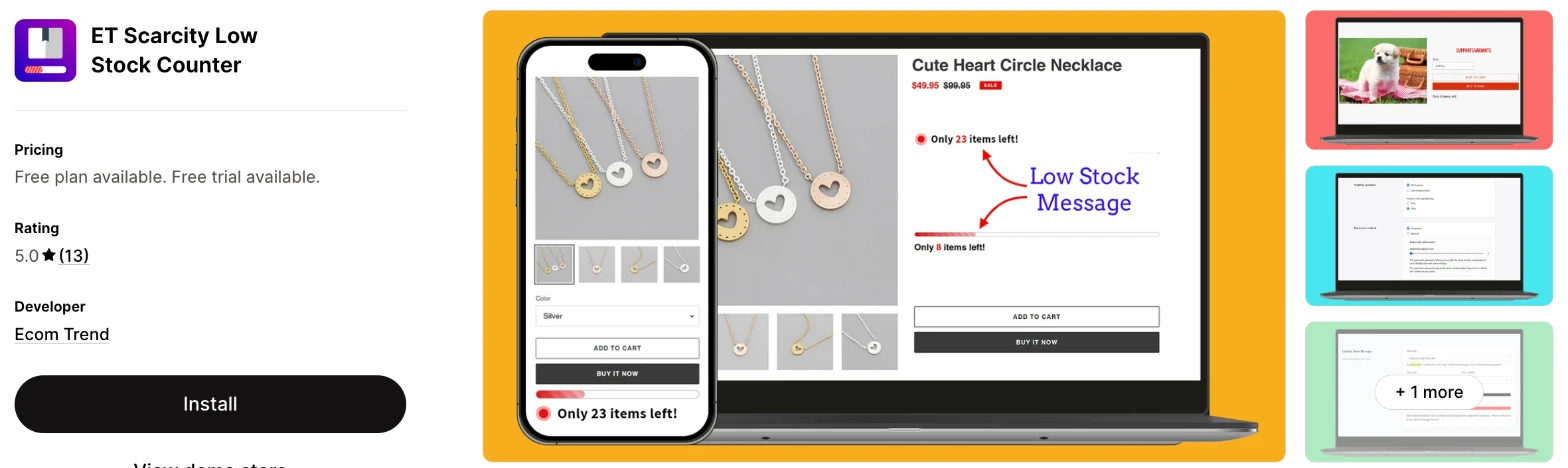
ET Scarcity Low Stock Counter is a product page app that shows a low stock message with an animated bar. It makes more sense when you only want the counter and don't need anything around it.
Why I like this app:
When I checked the plans, the free one already had the parts I'd use: variant counts, visibility conditions and style controls. Premium mainly removes the Ecom Trend watermark, so I could test the whole app without paying. Setup took me about 5 to 8 minutes, and it offers automatic or manual placement. One reviewer calls it lighter than other apps they tried, and another values the variant counts. However, it covers product pages only, and the newest review I found dates from October 2025.
Features:
- A low stock message on product pages
- An animated progress bar
- A count for each variant
- Visibility conditions
- Your own message and style
- Automatic or manual placement
I didn't find any AI features in it.
Pricing: ET Scarcity charges a flat fee:
- Free: all the counter features, with an Ecom Trend watermark
- Premium: $3.95/month or $33.20/year, removes the watermark and adds custom integration and priority support
- Trial: 3 days
Reviews: ET Scarcity has 5.0 stars from 13 reviews on the Shopify App Store. Reviewers like the customisable colours, and one free plan user matched it to their brand. I didn't find a review below 5 stars, but it has few reviews and none from the last 12 months.
Best for: A store that wants a variant-level counter and a progress bar on its product pages and is happy to start free.
See ET Scarcity Low Stock Counter on the Shopify App Store
5. Scarcity++ Low Stock Counter
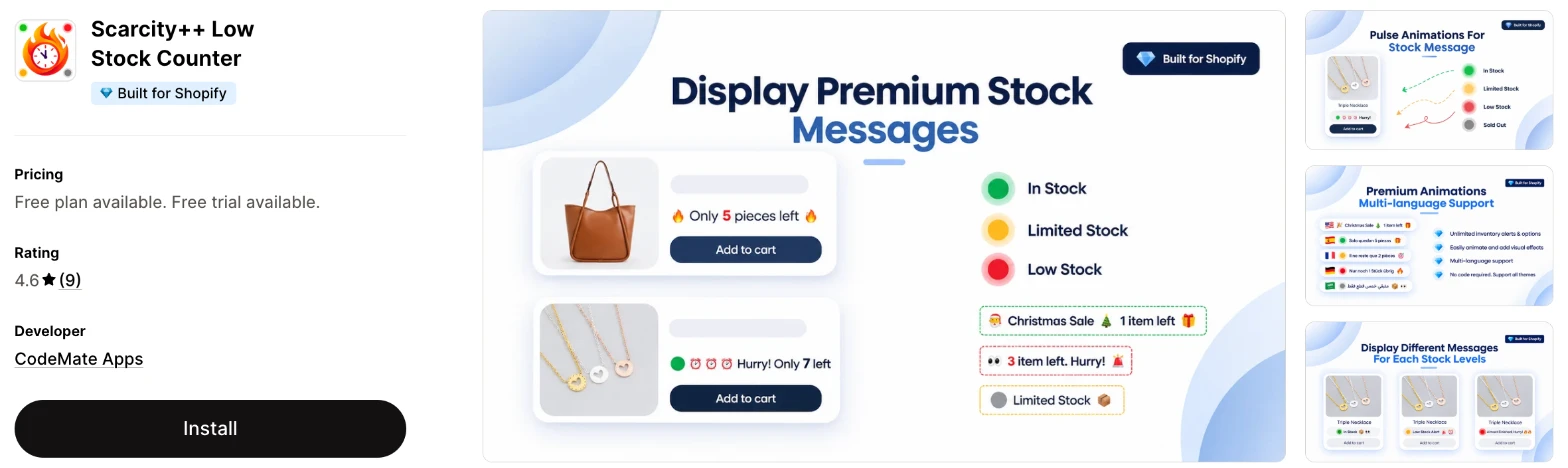
Scarcity++ Low Stock Counter is a product page app that changes its message as stock falls. Choose it when you want separate wording for in stock, limited and low stock states.
Why I like this app:
I found the most control over messages here, with thresholds that decide when each message appears, plus pulse animations and custom sold-out text. Getting it live took me about 5 to 8 minutes. All paid features come in one plan, with unlimited page views, so I had no tiers to compare. Reviewers praise fast support, and one had a broken layout fixed. But a reviewer says it counts total inventory, not the stock at the shopper's location, and the free plan is for development stores only.
Features:
- Low stock, available and sold-out messages
- Thresholds that decide when each message appears
- Different messages for different stock levels
- Pulse animations and emoji
- Halloween, Black Friday and Christmas presets
- Unlimited page views
I didn't find any AI features in it.
Pricing: Scarcity++ charges a flat fee, with the same features on each plan:
- Development stores: free, for testing only
- Monthly Unlimited: $4.99/month
- Yearly Unlimited: $47.99/year
- Trial: 7 days
Reviews: Scarcity++ has 4.6 stars from 9 reviews on the Shopify App Store. Recent reviewers call it easy to install, and one wanted only a note by the add to cart button. Its one low-star review, from August 2025, raises the location problem, and CodeMate Apps replies that it tried to reach the merchant.
Best for: A one-location store that wants different wording at each stock level.
See Scarcity++ Low Stock Counter on the Shopify App Store
6. Ultimate Scarcity Pro
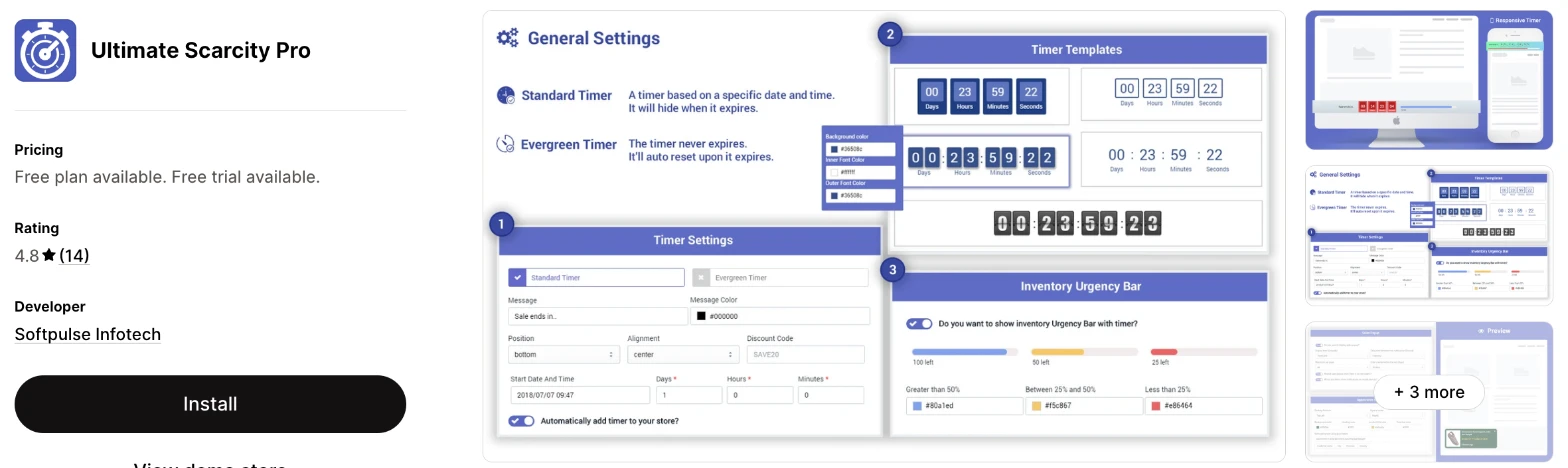
Ultimate Scarcity Pro is a set of urgency widgets, with a stock bar next to timers and social proof. I'd choose it when you want several urgency formats on a free plan and accept that the app gets few new reviews.
Why I like this app:
The free plan goes furthest here, with a countdown timer, stock bar, social proof, cart reservation bar and sales pops. I also found a stock running out bar for the cart page, which most of these apps don't list. Setup took me about 5 to 8 minutes. Older reviewers call it handy and easy to tailor to brand colours. However, its newest review dates from May 2022, and that merchant says it didn't work after they added the code.
Features:
- A stock bar with a timer
- A stock running out bar on the cart page
- Countdown timers with several templates
- Social proof and sales pops
- A cart reservation bar
- An announcement header bar
- Order Within and Get it By messages on Premium
- Custom CSS, colours and fonts
I didn't find any AI features in it.
Pricing: Ultimate Scarcity Pro charges a flat fee:
- Standard: free, with the Softpulse logo
- Premium: $8.99/month, adds Order Within and Get it By messages and premium templates, and removes the logo
- Trial: 3 days
Reviews: Ultimate Scarcity Pro has 4.8 stars from 14 reviews on the Shopify App Store. Older reviews praise the social proof and countdown bar, and one mentions a fast support reply. A UK reviewer wanted more customisation, and the most recent review describes an app that never worked for them.
Best for: A store that wants a timer, social proof and a stock bar for free and can test them carefully first.
See Ultimate Scarcity Pro on the Shopify App Store
7. Sold Count: Low Stock Counter
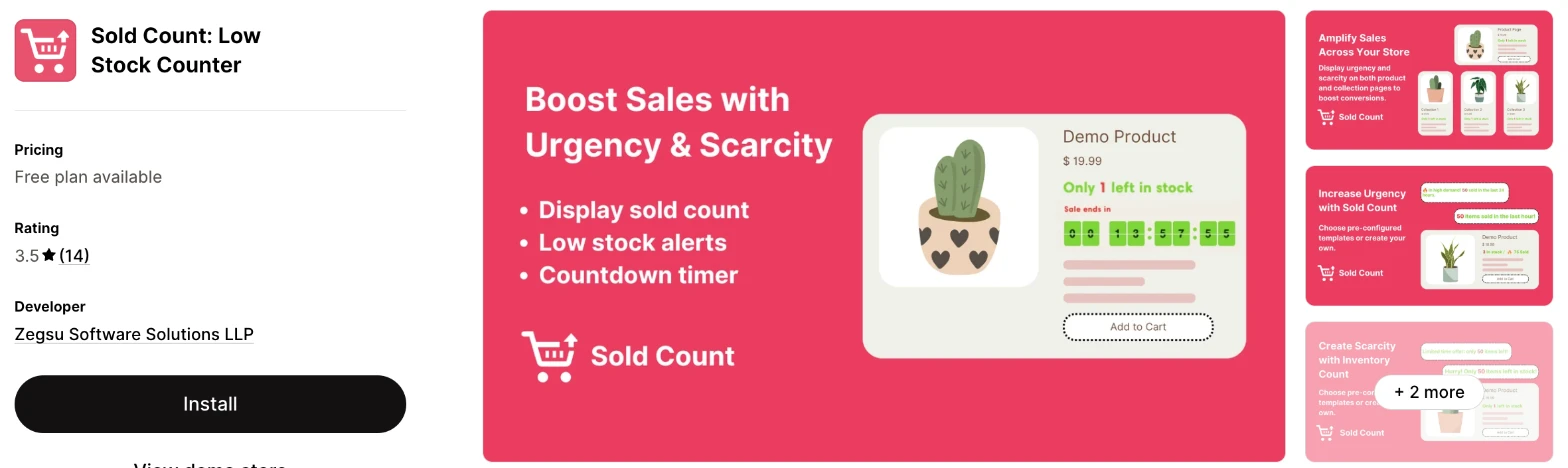
Sold Count: Low Stock Counter is a social proof app that shows how many units have sold next to a low stock message. It makes more sense when your sales numbers are a stronger message than your stock level.
Why I like this app:
Sold counts are the reason I'd look at this one, because no other app here leads with them. I also found separate widgets for one left, high stock and sold out, and a timer on the paid plan. It took me about 5 to 8 minutes to get a widget live. Earlier reviewers liked the help with custom installs. The main drawback is the 3.5 rating, because 2 of the 3 newest complaints say support didn't reply.
Features:
- A sold count and a low stock count
- An inventory display
- Widgets for one left, high stock and sold out
- Stock level thresholds
- A countdown timer on Prime
- Collection page widgets on Prime
I didn't find any AI features in it.
Pricing: Sold Count charges a flat fee:
- Free Forever: up to 3 products, basic customisation
- Prime: $9.99/month, unlimited products, a countdown timer, collection pages and advanced customisation
I didn't find a free trial on the listing.
Reviews: Sold Count has 3.5 stars from 14 reviews on the Shopify App Store, with 4 of them at one star. One reviewer says it speeds up purchases with its countdown and that support added a custom emoji. Low-star reviewers report unanswered support requests, and one calls the interface dated. Another says it only shows 60 days of sales, which Zegsu disputes.
Best for: A store that wants to show sold counts on a few products and can start on the free plan.
See Sold Count: Low Stock Counter on the Shopify App Store
How do you choose the right Shopify low stock app?
I'd start with where the counter needs to show, then check whether it follows your variants. I've put each app's rating, starting price and how it charges in this table:
| App | Rating | Starting price | Charges by |
|---|---|---|---|
| Vitals | 4.9 from 2,974 reviews | $29.99/month | One plan |
| Scarcity+Urgency | 4.7 from 88 reviews | $4.99/month | Flat fee |
| CI | 5.0 from 9 reviews | Free, then $2.99/month | Flat fee |
| ET Scarcity | 5.0 from 13 reviews | Free, then $3.95/month | Flat fee |
| Scarcity++ | 4.6 from 9 reviews | $4.99/month | Flat fee |
| Ultimate Scarcity Pro | 4.8 from 14 reviews | Free, then $8.99/month | Flat fee |
| Sold Count | 3.5 from 14 reviews | Free, then $9.99/month | Flat fee |
Where the counter shows rules out apps first. Vitals, ET Scarcity and Scarcity++ work on product pages, while Scarcity+Urgency, CI and Sold Count's paid plan reach collection pages too. Ultimate Scarcity Pro is the only one that lists a stock bar on the cart page, and Vitals has a separate Cart Notice app for that. Decide where shoppers need to see the message, then check that the plan you can afford includes it.
Variants are the next check for any store selling sizes or colours. A store-wide or product-wide count can say "Only 8 left" when the size a shopper wants has just one. Vitals, CI and ET Scarcity list variant counts. Pick a product with uneven stock and switch between its options on your test store.
Design depends on how much you can change on your plan. All 7 listings offer style controls, but CI's free plan limits text and style changes and Sold Count's free plan is basic. ET Scarcity and Ultimate Scarcity Pro show their own branding until you upgrade. Preview the message on your phone, because a bar that fits on a desktop can push your add to cart button further down.
Your other apps and theme decide how much checking you'll need. Scarcity+Urgency and CI name GemPages, and Scarcity+Urgency and Vitals name PageFly. Dropshipping stores should look at Scarcity+Urgency first, because it names sources such as DSers and Meesho. Check that your page builder's product pages show the counter before you rely on it.
Cost barely depends on your store's size with the 6 dedicated apps, because each charges a flat fee. They range from $2.99/month to $9.99/month, so a busy month won't change your bill. Vitals costs more, so I'd only compare it on price when you'd use its other apps too. On a free plan, check what's missing, such as CI's low stock warning or Sold Count's limit of 3 products.
Support draws strong praise on Scarcity+Urgency, CI and Scarcity++, where merchants describe fast replies and name the people who helped them. The sharpest complaints I found are on Sold Count, where merchants say requests went unanswered. When setup problems came up on my test store, a few customer success teams fixed them within minutes, while others took hours to reply. Send a test question during your trial and time the reply.
Choose Vitals if you'd use its other apps as well, and Scarcity+Urgency for AI-written counters on collection pages. Choose CI for the lowest price, ET Scarcity for a plain free counter and Scarcity++ for different wording at each stock level. Ultimate Scarcity Pro suits stores that want free timers and social proof, and Sold Count suits stores that want to show sales numbers.
Should a low stock counter show the real number?
Yes. Show the count your inventory supports, because a false low stock message can damage trust and create legal risk. The FTC's 2022 report on dark patterns treats false claims about low supply as a deceptive design practice.
Most of these apps use your store's inventory. Vitals reads the selected variant's stock from Shopify, and CI and Scarcity+Urgency describe real-time counts. I didn't find the same statement for Ultimate Scarcity Pro's stock bar, so I'd check where its number comes from before you turn it on.
Watch your presets as well. Messages such as "Hurry" are fine beside a true count, but they read badly on a product you restock every week. Compare the number on your product page with your Shopify inventory before you publish a counter.
What stock level should start the counter?
It depends on how quickly each product sells. I'd start at about one week of sales for each product. A product that sells 5 units a week would start at 5, and one that sells 30 a week would start at 30.
The default matters here. Vitals starts at 50, so a slow seller could show "Only 49 left", which doesn't sound scarce. Vitals also uses one level across the store, so exclude products where that level doesn't fit. One Scarcity++ reviewer chose that app for this rule, and one Scarcity+Urgency reviewer wanted a counter on low stock items only.
Try your level on 3 products with different sales speeds, then read each page as a shopper would.
What should shoppers see once a product sells out?
Give them a next step, because a sold-out page with no message is a dead end. Most apps here can add a message, but only some can say what happens next.
CI lists states such as restocking soon, and Sold Count has a replenishing soon option. Scarcity++ supports your own sold-out text. Vitals shows nothing on a sold-out variant by default, but a second message can appear on variants you keep selling.
None of these messages collects a shopper's email on its own. Vitals has a separate Back in Stock app in the same subscription, and other stores would need a dedicated back in stock app. Check your sold-out page after you install any counter.
How do you set up your first Shopify low stock counter?
I'd start with one best-selling product that has uneven stock across its variants, because it tests the count and the wording together.
Use these steps with any of the apps:
- Check that Shopify tracks inventory for the product.
- Install the app and choose the products it covers.
- Set the stock level that starts the message.
- Write a short message that includes the count.
- Match the colours and font to your theme.
- Place the message near your add to cart button.
- Switch between variants on your phone and desktop, then compare each count with Shopify.
Setup took me about 4 minutes on Vitals and about 5 to 8 minutes on the others. Merchants report mixed experiences too. Scarcity+Urgency and ET Scarcity reviewers call setup quick, and reviewers on CI and Scarcity++ describe support stepping in to help or fix a layout. A Sold Count reviewer needed a technician, and an Ultimate Scarcity Pro reviewer never got it working.
I'd leave the counter live for 2 to 4 weeks before you change the wording, so your results reflect more than one busy day.
What changes in unusual situations?
I found the right app can change with a sales peak, several stores or locations, a dropshipping setup, a plan-only feature or a move from another app.
During unusually high or seasonal sales, the flat fees on the 6 dedicated apps don't change, and Scarcity++ states unlimited page views. Scarcity+Urgency and Scarcity++ include Black Friday and Christmas presets. Vitals has one plan, at $29.99/month. Check your counts during a sale, because a count is only as accurate as your Shopify inventory.
With several locations, test what the count includes. One Scarcity++ reviewer says it counts total inventory and not the stock at the shopper's location, so a shopper could see stock that isn't available to them. I didn't find location settings on any listing, so ask support before you install. With several stores, I didn't find a multi-store plan, so budget for one subscription per store.
Dropshipping and untracked stock need their own check. Scarcity+Urgency names sources such as Roposo Clout, GlowRoad, Meesho, Modalyst and DSers. Vitals needs Shopify to track the product's inventory, or the message won't show. Made-to-order stores have no real stock to count, so I wouldn't use a counter on those products.
Some features only appear on certain plans. CI keeps its low stock warning for Premium, and Sold Count keeps unlimited products, timers and collection pages for Prime. ET Scarcity and Ultimate Scarcity Pro remove their branding only on paid plans.
Moving from another app is simpler here than in most categories, because your stock stays in Shopify. You'd recreate your wording, levels and styling in the new app. Turn off the old counter first, so shoppers don't see 2 messages, and check your theme for any code you added by hand. One Scarcity+Urgency reviewer found their earlier scarcity app didn't work with their site, so test the new one before you commit.
What are the benefits of a Shopify low stock app?
A low stock app gives shoppers a true reason to decide now, and you can test it for a few dollars a month. The effect depends on your store, so measure it on your own products.
Say you sell a $60 candle and 1,000 people view its page each month. At a 2% conversion rate, that's 20 orders. If a counter brought in 2 more orders, you'd add $120 in sales against a $4.99/month app. That's only an example of the sums to run, and I can't promise that result.
A counter also sets expectations. One Scarcity++ reviewer wanted shoppers to see why they couldn't order 20 items when only 8 remained. Another store uses Scarcity+Urgency to show the seats left in its workshops. The limit is that a counter only appears when stock is low, so it does little for products you always keep in deep stock.
Before you install an app, list the products that run low often enough to show the message.
What are some ideas for using a Shopify low stock app?
I'd try a count on your last sizes or colours first, because that's where a shopper's choice is most likely to depend on stock. These 5 ideas suit different types of store:
- Last sizes: a clothing store shows a count only when a size falls below 5.
- Limited runs: a print shop shows how many copies remain in each edition.
- Workshop seats: a craft studio shows the places left in each class.
- Seasonal gifts: a gift shop adds a count to products it can't reorder before Christmas.
- Larger orders: a hydroponics store shows its stock so buyers know why they can't order more.
I'd test the last sizes idea on your 3 best-selling products, then move to limited runs if you sell them.
Which Shopify low stock app would I start with?
I'd start with Vitals, because its low stock message comes with 40+ other apps in one subscription, so you may be able to remove your separate timer or review apps as well. Choose Scarcity+Urgency instead when you only want a counter and need it on collection pages, or CI when you want the lowest price. Install your choice, turn it on for 3 products and compare each count with Shopify.
What do merchants often ask about Shopify low stock apps?
How much does a Shopify low stock app cost?
Paid plans on these apps start between $2.99/month and $29.99/month, and CI, ET Scarcity, Ultimate Scarcity Pro and Sold Count have free plans for live stores. The dedicated apps charge a flat fee. Vitals costs $29.99/month, because it includes 40+ apps.
Does Shopify include low stock features without an app?
Partly. Some Shopify themes include an inventory status block with a low stock threshold, and it stays hidden until stock falls below that level. Check your theme editor first. It may be enough for a simple message, but you'd need an app for features such as collection page counters or AI-written text if your theme doesn't offer them.
Are there free Shopify low stock apps?
Yes, I found a free plan for live stores on 4 of these apps. CI's has no watermark but limits text and style changes, ET Scarcity's and Ultimate Scarcity Pro's show the developer's branding, and Sold Count's stops at 3 products. Scarcity+Urgency and Scarcity++ show "Free plan available" on the App Store, but their free plans are for development stores only. Vitals has no free plan and offers a 7-day trial.
Do low stock apps slow down a store?
A single app doesn't hurt on its own, but the effect grows with each one you add for jobs such as gifts or visitor recordings. Vitals loads everything from one app, so it doesn't slow down the store as you turn on more of its 40+ apps. One ET Scarcity reviewer calls that app lightweight. Test any app on your own store before and after you install it.
Do low stock counters update when a shopper picks a variant?
On some apps, yes. Vitals, CI and ET Scarcity list it, and a Scarcity++ reviewer says it works with variant inventories. I didn't find it on the Scarcity+Urgency, Ultimate Scarcity Pro or Sold Count listings, so test a product with several options during your trial.
Can a low stock counter show on collection pages?
Yes, on 3 of these apps. Scarcity+Urgency and CI include collection pages, and Sold Count keeps them for its $9.99/month Prime plan. Vitals, ET Scarcity and Scarcity++ list product pages only.